How to Check Inverter Battery Water Level (and Battery Health): Makers Compared
What the battery makers publish on reading the water level, how often to check it, which water to use and how to check battery health, including where a maker’s own guides contradict each other.
 OKAYA PowerON OPSJT17048 140 Ah Tubular BatterySuper Jumbo tubular, 48 months total warranty₹10,200Amazon, 8 Nov 2026★ 4.3Check price ↗
 Genus Hallabol GTT200 165 Ah Tall Tubular BatteryInverter battery, 72 months warranty₹14,000Amazon, 8 Nov 2026★ 4.1Check price ↗
 Luminous Red Charge RC 18000 150 Ah Tall Tubular Battery12V, leak resistant, low maintenance, 36 months warranty₹14,400Amazon, 8 Nov 2026★ 4.2Check price ↗
 Luminous Red Charge RC 25000 200 Ah Tall Tubular BatteryInverter battery, 36 months warranty₹18,600Amazon, 8 Nov 2026★ 4.3Check price ↗
The short answer. On a tubular or other flooded battery, look at the float indicator on top of each cell. Luminous says a float “high up in the green zone” is fine and a float at the red mark “needs an immediate top-up”. Top up only to the marked level. How often is where the makers split: in the documents we read, Luminous, Livfast, Okaya and Microtek each publish more than one interval of their own, so there is no single correct number. The table below gives every figure with its source.
What we read, on 30 September and 1 October 2026: Luminous blog posts and product pages; Livfast’s battery page, blog posts and Smart Flash 1125+ manual; Okaya’s FAQ, two blog posts and product pages; six Microtek inverter manuals and a Microtek blog post; Exide’s Home GQP manual and battery warranty terms; Amaron’s battery pages and a V-Guard FAQ.
First: does your battery have water to check?
Not every inverter battery does. Luminous says sealed (SMF or VRLA) batteries are “generally maintenance-free and should not be opened for water filling”. Livfast heads its water advice “Track Water Levels (for Tubular Batteries)”, and Okaya marks its water step “(Applicable for Flooded Batteries)”.
How to check inverter battery water level: reading the indicator
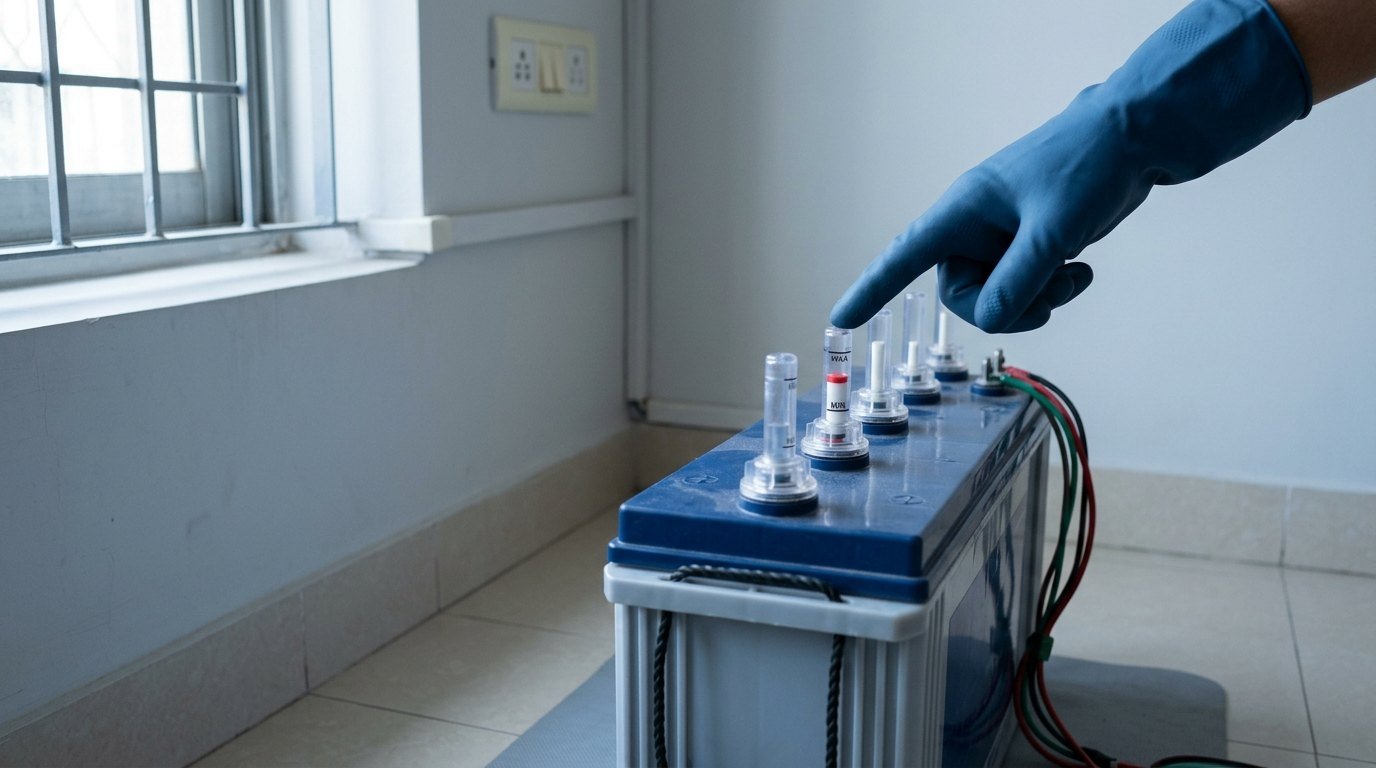
Float indicators. Luminous: “If the float sits high up in the green zone, your inverter battery water level is perfectly fine.” and “If the float has dropped down to the red mark, it means the water inside that specific cell has dried up and needs an immediate top-up.” Okaya’s FAQ reads the same way: “If the float is up, the level is sufficient.”
Some product pages name the indicator fitted: Luminous’s RC 18000 “Comes with 6 free float indicators”, and Okaya’s OPSJT17048 lists “6 Ceramic Water Level Indicators”. Okaya’s range page says “You can visually check the water level without removing any plugs or using tools”.
No indicator? Okaya’s health blog describes a different method: “This entails carefully removing the battery’s vent caps to check that the liquid adequately covers the internal plates.” That is generic flooded-battery advice, and it sits against Okaya’s own range-page line about not removing plugs. If your battery has float or indicator plugs, read the indicator.
The marks. Livfast says the level “should be between the minimum and maximum limit”. Microtek’s blog says “Fill water only up to the marked level. Don’t overfill.” Luminous says “Stop at the recommended mark. Do not fill to the brim”. Exide’s GQP inverter manual says “Add only distilled water in each cell until battery acid reaches level specified by the battery manufacturer.”
Your inverter may tell you first. Microtek’s LUXE NEW manual shows “YLo” as a “Water level low warning”. Livfast’s Smart Flash 1125+ manual answers its water-level warning with an instruction to refill “DM water”. If the inverter is the problem rather than the water, see why an inverter is not charging.
Steps, in the order the makers describe them
- Confirm your battery takes water. Sealed batteries are not opened (Luminous).
- Read each cell’s float (Luminous, Okaya).
- Pick your moment. Luminous: “If the level is only slightly low, topping up after a full charge often gives a more accurate level, because the electrolyte can expand during charging”.
- Top up to the mark, no further. Okaya: “Simply add distilled/demineralised (DM) water through the float opening until the float rises back.” Exide’s manual adds “Do not over fill.”
- Watch for one cell falling faster. Luminous: “If one cell keeps dropping faster, the battery may need professional inspection”.
How often to check: every figure we found, with its source
| Maker | Document | What it says |
|---|---|---|
| Luminous | Blog, 2 September 2026, body | “once every two to three months” |
| Luminous | Same blog, FAQ | “In many homes, checking every two to four weeks works well” |
| Luminous | Buying-guide blog | tubular: “a water check every 2 to 3 months” |
| Livfast | Inverter-batteries page | “every 2 to 3 months” |
| Livfast | Health blog, 1 October 2025 | tubular: “once every two months” |
| Livfast | 150Ah battery blog | “once every one to two months” |
| Okaya | FAQ | every 1 to 3 months, “depending on usage/temperature” |
| Okaya | Same FAQ, another answer | “monthly water checks” |
| Microtek | Blog, 27 May 2025 | “every 30 to 45 days during summer” |
| Microtek | Same blog | “A quick monthly check is enough to keep your battery healthy.” |
| Microtek | Six inverter manuals | “Check battery water”, no interval |
| Amaron | Tubular battery page | “longer top-up intervals”, no figure |
The contradictions sit inside single makers: Luminous, Okaya and Microtek each give two intervals on one page, and Livfast gives three across three documents. Microtek ties its summer figure to heat: “Heat can cause battery water to evaporate faster, which increases the need for maintenance.” Use your own battery maker’s guidance. For how Microtek and Luminous inverters compare, see Microtek vs Luminous inverter.
Which water: distilled or DM, and who says so
These makers name distilled or demineralised (DM) water in the documents we read:
- Luminous: “Use distilled water and nothing else.”
- Okaya: “Tap water contains minerals and impurities that cause sulfation/corrosion, reducing life and backup. Use distilled/DM water only”.
- Exide: the GQP manual says “Add only distilled water”, and the warranty terms say topping up must use “pure distilled water conforming to IS specification number 1069-1964”. The warranty is void for “refilling with additives/dopes or any substance other than de-mineralised/distilled water”.
- Livfast: its page says “Always top with distilled water”, and its Smart Flash manual says “DM water”.
- Microtek, in its blog only: “This water is not regular tap water, but it’s distilled water.” and “Use only distilled water for topping up.”
Microtek’s six manuals name no water type; their instruction is “Check battery water”. V-Guard’s FAQ asks owners to “top up the battery water from time to time” without naming a type, and Amaron’s home-UPS pages we read name none either. Okaya’s blog adds that “it’s important to avoid adding acid.”
How to check inverter battery health
Voltage, with Okaya’s conditions. Okaya’s blog uses a digital multimeter across the terminals, with a condition: “This step should be done with the inverter turned off and all connected loads disconnected to ensure an accurate reading.” Its figure: “A healthy 12V inverter battery should display a voltage in the range of 12.6 to 12.8 volts. Readings below this range may indicate a need for recharging or a potential battery weakness.” Livfast’s blog gives the same range, “For 12V batteries, a healthy reading is usually between 12.6 to 12.8 volts.”, but states no test condition.
A different number, for a different purpose. A separate Okaya post lists an open circuit voltage of 12.50 to 12.70 V in a table of standard test parameters, at 27±2°C. That is a test condition, not a home health threshold. Do not read your multimeter against it.
Not a full-charge test. Neither Okaya nor Livfast calls 12.6 to 12.8 V “fully charged”; both call it healthy. For full charge, the Exide GQP and Microtek LED-model manuals point to the inverter’s own LED.
Load test. Okaya: “With the inverter on, connect a moderate load (like a lamp or fan) and observe how the battery manages. Should the voltage plummet quickly or if the inverter fails under this load, it’s a clear indicator that the battery’s efficiency is compromised, suggesting a possible need for replacement.”
Visible and behavioural signs. Livfast: “Check the battery casing for signs of cracks, leaks, or bulges.” and “If the backup has reduced significantly compared to before, it may be losing capacity.” Okaya: “Be on the lookout for any signs of physical damage, leaks, or corrosion on the terminals”. Luminous says to have the battery inspected if it shows “leakage, swelling or heavy corrosion”.
Specific gravity. Beyond Okaya’s test table above, which lists it as a test parameter, the only mention in the documents we read is Okaya’s FAQ, for an inverter showing low battery when the batteries are charged: “A technician can run a specific-gravity/voltage check and rule out sensor/PCB issues”.
Safety: the makers’ own lines
- Livfast: “Make sure to wear gloves or avoid any physical contact with the liquid”
- Microtek: “Wear gloves if needed and keep the area clean.” and “Don’t overfill.”
- Exide: “Be careful not to allow corrosion to come in contact with eyes.”
- Luminous: “Do not open the battery or try to repair it yourself”
- Okaya, on placement: “A well-ventilated, dry, cool location”, away from heat, sunlight, sparks and children’s reach.
- Okaya, on checks: “If you’re ever in doubt or face issues that seem beyond simple maintenance, don’t hesitate to seek professional assistance.”
What we could not verify
- How much water to add. No volume in ml or litres, for a 150Ah battery or any other, in the documents we read. Makers state a level, not a volume.
- The gap between the minimum and maximum marks in mm or ml: not given in any document we read.
- Specific gravity as a home check. We looked for hydrometer steps or a target reading in the Livfast, Okaya, Luminous and Exide documents above, Microtek’s blog and Amaron’s tubular page, and found none beyond Okaya’s technician line and its test-table parameter.
- Amaron’s home method. Beyond “longer top-up intervals”, the Amaron inverter-battery pages we read give no water-check method.
- A battery-side full-charge reading: no maker document we read gives one.
Where to Buy the Okaya OPSJT17048
Amazon India price on 31 October 2026, rounded to the nearest ₹100 (prices change often). This section covers only the one model listed; the other batteries named on this page are not in it. As an Amazon Associate, HomeVerdicts earns from qualifying purchases made through this link.
Okaya PowerON OPSJT17048 (140 Ah Super Jumbo Tubular)
6 ceramic water level indicators, 12 V
Choosing from scratch? See Best Inverter Battery for Home in India (2026).
FAQ
How do I check the water level in my inverter battery?
Look at the float indicator on each cell: Luminous says green zone is fine and the red mark needs a top-up. Okaya’s blog, for flooded batteries in general, describes removing the vent caps to check the liquid covers the plates.
How often should I add water to an inverter battery?
The makers publish how often to check, and there is no single figure. Microtek’s blog says “every 30 to 45 days during summer” and, on the same page, “A quick monthly check is enough”. Livfast gives three intervals across three documents, from “once every one to two months” to “every 2 to 3 months”. The table above lists every figure; follow your own battery maker.
How do I know if my inverter battery is healthy?
Okaya and Livfast both give 12.6 to 12.8 volts as healthy for a 12V battery. Only Okaya states the condition: inverter off and all loads disconnected. Okaya also describes a load test, and Livfast lists bulges, leaks and shorter backup as warning signs.
How much water does a 150Ah battery need?
None of the maker documents we read gives a volume, for a 150Ah battery or any other. They give a level: fill to the marked level or until the float rises, and do not overfill.
Related reading on HomeVerdicts: Best inverter battery for home · Inverter not charging · Microtek vs Luminous inverter · How we research