Difference Between UPS and Inverter: Which Do You Actually Need?
By Samiya
 APC Back-UPS BX600C-IN600VA / 360W backup for WiFi router and desktop₹3,600Amazon, 8 Nov 2026★ 3.8Check price ↗
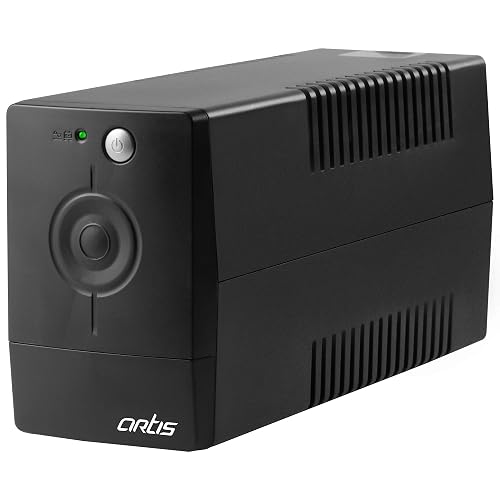 Artis PS-600VA600VA line interactive UPS for personal computer₹2,500Amazon, 8 Nov 2026★ 3.8Check price ↗
 Luminous Zelio+ 1100900VA 12V pure sine wave inverter for home₹6,400Amazon, 8 Nov 2026★ 4.1Check price ↗
 MICROTEK iMERLYN UPS 105012V, 900VA/725W digital wave inverter₹5,800Amazon, 8 Nov 2026★ 4.1Check price ↗
Prices and ratings in the boxes above are Amazon selling prices read on 8 Nov 2026, rounded to the nearest ₹100. Products are the most-rated ones of each type that we found, shown as examples, not a ranking. Prices quoted in the text below are from the dates given beside them and may differ from today’s Amazon price.
This page sets out what Microtek and Luminous publish about UPS and inverter backup: changeover times, mode voltage ranges, battery sizing and what not to connect. Every figure comes from their brochures, manuals, product pages, FAQs and blogs, read 30 September 2026. Where a number is our arithmetic, we say so.
The short answer. In Indian homes the line is blurred. Both makers sell their home inverters as a “Home UPS”: Luminous names one the “Zelio 1100+ Sine Wave Home UPS”, and Microtek titles its category “INVERTER/HOME UPS”. Microtek’s documents describe a UPS mode with a narrow input window and an inverter mode with a wider one, and its six series brochures publish a UPS-mode transfer time of 15 ms or less. Luminous describes UPS and Eco modes on its Zelio+, Power Sine, Zolt, Optimus and Hercules pages, and three of its product pages publish a switchover under 15 ms without saying which mode it applies to. Neither maker publishes a changeover time for inverter or eco mode on the pages we read. Line-interactive and online UPS units are separate product classes, and Microtek’s brochures for them publish different figures.
Luminous’s FAQ draws the line this way: “An inverter provides backup power during outages and is designed for longer backup durations for household appliances. A UPS (Uninterruptible Power Supply) provides almost instant switchover and is mainly used for sensitive electronics like computers and networking equipment where even a short interruption is not acceptable.”
- Choose a home inverter (“Home UPS”) for household loads through a power cut. Microtek’s brochures show its intended loads as icons: fan/light, LED TV, laptop and Wi-Fi router.
- Choose a computer UPS for the use Luminous’s FAQ names: computers and networking equipment “where even a short interruption is not acceptable”.
- For an air conditioner, neither maker points you to a standard home inverter (section below).
The difference between UPS and inverter, in published changeover times
| Device, per the maker’s own document | Changeover time, as published | Where it is published |
|---|---|---|
| Microtek home inverter (“Home UPS”), UPS mode | “UPS Transfer Time ≤ 15msec.” | Six Microtek series brochures (pure sine and digital models); the LUXE NEW and Energy Saver NEW DG manuals also give 15 msec; the Energy Saver NEW 1225 SW product page says “Changeover Time: <15 milliseconds” without naming a mode |
| Luminous home inverter, mode not stated on the page | “quick switchover in under 15 ms” (Power Sine 1100); “ultra-fast switchover (<15 ms)” (Hercules 1600) | Three Luminous product pages: Power Sine 1100, Hercules 1600, Hercules Sine Pro 1500 |
| Either maker’s home inverter, inverter or eco mode | Not published on the documents we read | See below |
| Microtek line-interactive computer UPS (Desire Pro+ 1000/2000) | “Typical 4-8 ms” | Microtek’s Desire series brochure |
| Microtek online UPS (E² 1 kVA) | “AC MODE TO BATTERY MODE: 0” | Microtek’s E² series brochure |
Reading the table. Where the two home-inverter makers publish a figure, it is the same class: 15 ms or less for UPS mode (Microtek’s brochures) and under 15 ms with no mode named (three Luminous product pages). The last two rows are not home inverters, and they are two different product classes from each other: Microtek’s line-interactive computer UPS at a typical 4 to 8 ms, and its online UPS at 0 from mains to battery.
What neither maker publishes. We found no changeover time for inverter or eco mode from either maker in all six Microtek series brochures, three Microtek manuals, 14 Microtek product pages, 23 Luminous product pages and Luminous’s 2026 catalogue. Most Luminous pages state no switchover figure at all: only three of the 23 publish one, and the Zelio+ 1100 page is not one of them.
One Luminous document disagrees. Its buying-guide blog (3 September 2026) says “A UPS inverter for home switches in less than 10 milliseconds”. Its product pages say under 15 ms. We treat the product pages as the spec and the blog as marketing, so the table carries the product-page figure.
Waveform is a separate question from changeover. Microtek’s line-interactive brochure states “Simulated Sine Wave” output, and both makers sell home inverters in pure sine and non-sine versions; our sine wave vs square wave inverter page covers that choice.
UPS mode vs inverter (eco) mode on the same home inverter
| Setting | UPS mode | Inverter mode (Microtek) / Eco mode (Luminous) |
|---|---|---|
| Microtek input window | 180 to 265 V | 80 to 290 V |
| Luminous UPS-mode voltage range (not labelled as input) | 180 to 260 V | “Wider voltage range to reduce battery usage”; value not published |
| What Luminous says each is for | “for appliance safety” | “for reduced battery usage” |
| Changeover time | 15 ms or less (Microtek) | Not published by either maker on the pages we read |
Sources: Microtek’s newer manuals and product pages; Luminous’s Zelio+ 1100 and 1700, Power Sine 1100, Zolt 1100, Hercules 1600 and Hercules Sine Pro 1500 product pages. Luminous’s under 15 ms (three pages) names no mode, so it sits in neither column.
Microtek’s brochures, manuals and product pages label its per-mode ranges as input. Luminous’s Zelio+ 1100 and 1700 pages say UPS-mode output voltage is “regulated between” 180 and 260 V; its Power Sine and Zolt pages give the range without saying input or output.
Microtek’s own documents disagree on the window. The older LUXE brochure prints “Inverter Mode: 100V-300V UPS Mode: 180V-260V”. A newer Microtek manual (Issue 06, dated 01/02/2026) agrees with the product pages on 80 to 290 V and 180 to 265 V, so the table uses those.
Microtek’s brochures label the control “UPS & INVERTER MODE” with the caption “For Running IT & Home Load”. Luminous describes the Optimus 1250+ as having “Eco & UPS modes to choose between longer backup or better performance”.
How to switch. Microtek’s LUXE NEW manual: “To changeover from UPS mode to Inverter mode: Press Power Button for 2secs.” The Energy Saver NEW DG manual gives the same step. We could not read Luminous’s procedure: its document centre served a placeholder sample file instead of a manual on 30 September 2026.
Backup time: a worked example with the makers’ formula
Both makers publish the same battery formula. Microtek’s blog (13 December 2025): “Battery Ah = (Backup hours multiplied by overall load in watts) divided by battery voltage”. Luminous’s blog (3 September 2026): “Battery Capacity (Ah) = (Power Needed in Watts x Backup Hours) divided by Battery Voltage (usually 12V)”. For inverter size, Microtek writes “VA = overall watts divided by 0.8”, and a Luminous blog gives the same 0.8: “400 watts ÷ 0.8 = 500 VA”.
Neither published formula, on the pages we read, carries an efficiency term. Microtek’s brochures do state an inverter efficiency of “> 80%” for pure sine models (some Microtek product pages print “<80%”; we use the brochure figure), so we show the example both ways. Every step below is our arithmetic.
Example: 400 W of load for 4 hours on a 12 V battery. Inverter size by the 0.8 rule: 400 ÷ 0.8 = 500 VA.
| Step | Makers’ formula | Adding Microtek’s “> 80%” efficiency (our addition, at 80%) |
|---|---|---|
| Energy needed | 400 W × 4 h = 1,600 Wh | 1,600 ÷ 0.80 = 2,000 Wh |
| Battery capacity | 1,600 ÷ 12 = about 133 Ah | 2,000 ÷ 12 = about 167 Ah |
Luminous’s FAQ compares two battery sizes: “A 150Ah battery is suitable for moderate household usage and shorter backup needs” and “A 200Ah battery is better for larger homes, heavier appliance loads, or longer backup duration”, adding that “customers should refer to the load chart for appropriate selection.” About 133 Ah fits within 150 Ah; about 167 Ah does not, and needs the 200 Ah size (our arithmetic). Both results fall inside the “100AH-200AH” lead-acid range Microtek’s LUXE NEW manual gives for its 12 V models. Luminous’s blog also notes that “Some sizing guides recommend allowing around 20% to 25% additional capacity for starting or surge loads”; on 500 VA that is 600 to 625 VA (our arithmetic).
We do not reuse the worked example in Luminous’s buying guide: that page totals a load at 360 W, then sizes for “538.75 VA” and “your 431-watt load”, and the figures do not reconcile (360 ÷ 0.8 = 450 VA, our arithmetic).
Read the VA, not the model number. Microtek’s UPS LUXE 1400 is titled “1100VA/825W”, and Luminous’s Zelio+ 1100 is a 900 VA unit. Our Microtek vs Luminous inverter page matches the two makers’ models by VA.
Can a home inverter run an AC?
Luminous’s buying guide: “Standard home inverters under 1100 VA cannot support an air conditioner. You need a dedicated high-capacity inverter for home use to run heavy appliances like ACs, large fridges, or geysers safely.” The same guide advises: “Avoid planning for heavy loads like a geyser, induction cooktop, microwave, iron, or AC.”
Microtek’s blog on high-capacity units: “If you load these machines on a standard inverter, it may overload or shut down. Even the appliance or inverter may be damaged.” Its example: “If you have to power an AC (2000W) and a microwave (1200W), you will require at least a 3200W UPS, such as the JM SW 4500+.” That is Microtek’s example naming its own product, not our recommendation, and we have no spec sheet for that model.
For scale, Microtek’s own 92-product home-inverter listing runs from 510 W to 1,680 W, below the 2000 W Microtek gives the AC in that example (our comparison). If you are still choosing the AC itself, see split AC vs window AC.
What not to connect
Microtek’s LUXE NEW manual states:
- “The output of the UPS should never be connected to a generator or incoming utility power source. This situation is far worse than a short-circuit.”
- “Avoid connecting the stabilizer between Utility Power and UPS. The AVR of the stabilizer may cause rebooting of the Computer.”
- “Ensure that ELCB/RCCB is not connected at either Input or Output”.
These come from one Microtek manual. We could not read a Luminous equivalent, because no Luminous manual was available to us.
What we could not verify
- Changeover time in inverter or eco mode, from either maker, in the documents listed above.
- Luminous’s eco-mode voltage range, mode-switching steps and “do not connect” list. No Luminous manual was available.
- A standards-body definition of UPS vs inverter. We did not read one, so the page cites none.
- Microtek’s per-model backup hours. On the Microtek product pages we read, none states the battery used and none gives a total load in watts, so we do not compare them.
- Whether a 150 Ah battery can run an AC. Neither maker states it on the pages we read.
Buying a New Inverter? Start Here
The full comparison is in Best Inverter for Home in India (2026), the HomeVerdicts guide to inverters for home use. These are the first two products in that guide; the guide compares all of them.
Amazon India prices on 31 October 2026, rounded to the nearest ₹100 (prices change often). As an Amazon Associate, HomeVerdicts earns from qualifying purchases made through these links.
Exide Home Star STAR12V900 (900 VA / 12 V)
900 VA, pure sine wave
Luminous Power Sine 800 (700 VA / 12 V)
700 VA, pure sine wave
FAQs
What is better, an inverter or UPS?
It depends on the load. Luminous’s FAQ places the inverter on “longer backup durations for household appliances” and the UPS on “computers and networking equipment”. On a home inverter, Microtek’s brochures publish 15 ms or less for UPS mode, and three Luminous product pages publish under 15 ms without naming a mode.
Can we use UPS for AC?
Not a standard home inverter, by either maker’s account. Luminous says units “under 1100 VA cannot support an air conditioner”; Microtek’s own example of an AC plus a microwave calls for “at least a 3200W UPS”.
Which UPS gives 4 hours backup?
Neither maker publishes a model-level 4-hour figure on the pages we read. By their formula, 400 W for 4 hours on 12 V needs about 133 Ah, or about 167 Ah if you allow for Microtek’s “> 80%” efficiency (our arithmetic, shown above).
What is the lifespan of a UPS battery?
Luminous’s FAQ puts most inverter batteries at around 3 to 5 years, “depending on usage, maintenance, and charging conditions.” We found no computer-UPS battery figure.
Related reading on HomeVerdicts: Microtek vs Luminous inverter · Sine wave vs square wave inverter · Split AC vs window AC · How we research